AboutTermsPrivacyContact
 
Updating
Sensibo

Sensibo

Released: 2015-05-06
© Sensibo, Inc. 2022
Sensibo - QR Code
Version 3.4.49
4+
Download on the App Store
Version 3.4.49
4+
Download on the App Store
Released: 2015-05-06
© Sensibo, Inc. 2022

iPhone Screenshots

Screenshot
Screenshot
Screenshot
Screenshot
Screenshot
Screenshot
Screenshot
Screenshot
Screenshot

iPad Screenshots

Screenshot

Description

Sensibo - Make your air conditioner or heat pump smart & take control of your indoor climate from your phone.
With Sensibo it’s easy for you to save on energy bills, reduce AC related carbon emissions and improve your health with our indoor air quality devices.
• Requires a Sensibo device
• 1 year limited warranty included for all products
• Learn more at https://sensibo.com
Sensibo devices:
Sensibo Sky
Smart air conditioner / heat pump controller
Sensibo Air & Sensibo Air PRO
Smart air conditioner / heat pump controller, Apple HomeKit and Sensibo Room Sensor compatible
Sensibo Room Sensor
For motion sensing and extra comfort
Sensibo Pure
Smart sensing, HEPA filter air purifier
Sensibo Elements
Indoor air quality monitor for CO₂ TVOC, PM2.5, Ethanol, Temperature & Humidity
With Sensibo you can:
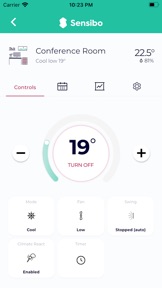
• Control your air conditioner or heat pump from anywhere in the world
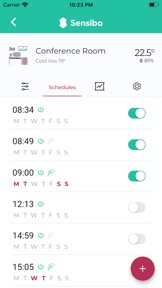
• Set 7-day scheduling & timers
• Reduce your electricity bills and curb carbon emissions
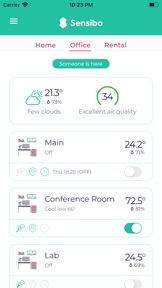
• Monitor your rooms temperature and humidity in real time
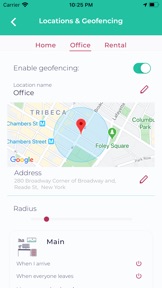
• Automatically turn on your AC when you arrive and turns off when everybody leaves
• Reacts automatically to temperature and humidity
• Filter cleaning reminders - get alerted when your filters need cleaning
• Share your device with other people (family, co-workers, friends)
• Clean and monitor the air you and your loved ones breathe
• Works with Google Home, Amazon Alexa, Siri Shortcuts, Apple HomeKit, SmartThings and more
Sensibo app is compatible in 12 languages!
English, Italiano, Français, Nederlands, Deutsch, עברית, العربية, Español, Svenska, 中国人, Dansk, Norsk,
Sensibo Plus
The Sensibo app is free to use, but you can get even more energy savings, automations, and health benefits out of Sensibo by activating Sensibo Plus. Sensibo Plus enhances your Sensibo experience with advanced features such as scheduling for Climate React, weather & pollution alerts, anti-mold, auto off, statistics, event logs for 30 days and more.
Pricing & Terms of Use
For Sensibo Plus, we offer the following subscriptions:
$2.99 / month*
* Prices displayed are in USD ($), actual charges might be converted to local currency depending on your country of residence.
The subscription amount will be charged to your iTunes account. The subscription will automatically renew unless canceled at least 24-hours before the end of the current period. If not canceled, your account will be charged the above mentioned amount for the renewal within 24 hours prior to the end of the current period.
You can cancel your subscription anytime within the on your iTunes account settings.
For more information:
Terms and Conditions
https://sensibo.com/pages/legal
Privacy Policy
https://sensibo.com/pages/privacy-policy
*** Requires a Sensibo device, available for purchase at https://sensibo.com ***

What's New in Version 3.4.49

- Bug fixes and Geofencing improvements
- We redesigned the device screen to add more features in the future.
- Now you can add a names to your schedules
- Added a detailed usage statistics page.
- Prevent mold growth inside your AC using the “Anti-Mold” feature.
- You will never forget your AC on again thanks to “auto turn off”.
- Device controls are now expanded by default.
- Added “Hour” timeframe to graphs.

Seller

Name

SENSIBO LTD

Information

Developer

Categories

Version

3.4.49

Size

72.6 MB

Game Center

No

VPP Device Licensing

Yes

Rating

Rated: 4+

Compatibility

iOS 10.0 or later

Devices

iPhone 5s, iPhone 6, iPhone 6 Plus, iPhone 6s, iPhone 6s Plus, iPhone SE, iPhone 7, iPhone 7 Plus, iPhone 8, iPhone 8 Plus, iPhone X, iPhone XR, iPhone XS, iPhone XS Max, iPhone 11, iPhone 11 Pro, iPhone 11 Pro Max, iPhone SE (2nd generation), iPhone 12, iPhone 12 Pro, iPhone 12 Pro Max, iPhone 12 mini, iPhone 13, iPhone 13 Pro, iPhone 13 Pro Max, iPhone 13 mini, iPhone SE (3rd generation), iPhone 14, iPhone 14 Plus, iPhone 14 Pro, iPhone 14 Pro Max, iPad (5th Generation) Wi-Fi, iPad (5th Generation) Wi-Fi + Cellular, iPad (6th generation) Wi-Fi, iPad (6th generation) Wi-Fi + Cellular, iPad Pro, iPad Pro (Cellular), iPad Pro (9.7-inch), iPad Pro (9.7-inch) (Cellular), iPad Pro 12.9-inch (2nd generation), iPad Pro 12.9-inch (2nd generation) Wi-Fi + Cellular, iPad Pro (10.5-inch), iPad Pro (10.5-inch) Wi-Fi + Cellular, iPad Pro (11-inch), iPad Pro (11-inch) Wi-Fi + Cellular, iPad Pro 12.9-inch (3rd generation), iPad Pro 12.9-inch (3rd generation) Wi-Fi + Cellular, iPad Air, iPad Air (Cellular), iPad Air 2, iPad Air 2 (Cellular), iPad Air (3rd generation), iPad Air (3rd generation) Wi-Fi + Cellular, iPad mini Retina, iPad mini Retina (Cellular), iPad mini 3, iPad mini 3 (Cellular), iPad mini 4, iPad mini 4 (Cellular), iPad mini (5th Generation), iPad mini (5th Generation) Wi-Fi + Cellular, iPad (7th generation) Wi-Fi + Cellular, iPad Pro 11-inch (2nd generation), iPad Pro 11-inch (2nd generation) Wi-Fi + Cellular, iPad Pro 12.9-inch (4th generation), iPad Pro 12.9-inch (4th generation) Wi-Fi + Cellular, iPad Air (4th Generation) (Wi-Fi), iPad Air (4th Generation) (Wi-Fi + Cellular), iPad (8th generation) Wi-Fi, iPad (8th generation) Wi-Fi + Cellular, iPad Pro 11-inch (3rd generation), iPad Pro 11-inch (3rd generation) Wi-Fi + Cellular, iPad Pro 12.9-inch (5th Generation), iPad Pro 12.9-inch (5th Generation) Wi-Fi + Cellular, iPad (9th Generation), iPad (9th Generation) Wi-Fi + Cellular, iPad mini (6th Generation), iPad mini (6th Generation) Wi-Fi + Cellular, iPad Air (5th generation), iPad Air (5th generation) Wi-Fi + Cellular, iPad Pro 11-inch (4th generation), iPad Pro 11-inch (4th generation) Wi-Fi + Cellular, iPad Pro 12.9-inch (6th generation), iPad Pro 12.9-inch (6th generation) Wi-Fi + Cellular, iPad (10th generation), iPad (10th generation) Wi-Fi + Cellular, iPod touch (6th Generation), iPod touch (7th generation)

Languages

English, Arabic, Danish, Dutch, French, German, Hebrew, Italian, Japanese, Norwegian Bokmål, Spanish, Swedish

App Store: Customer Ratings

Ratings & Reviews

4.0 of 5 (26 Ratings)

App Store: Customer Reviews

2022-12-26

Bug

The schedule got bug keep showing turn on instead of turning off
mleeleejuan
Version 3.4.49
2022-12-12

Sensibo Air

This climate aircon control is superb!!! U will nvr regret getting one. Easy to setup n interface is easy to use n navigate. Great product!!! Two thumbs up Sensibo!!!👍🏻👍🏻👍🏻👍🏻👍🏻👍🏻
Galaric73
Version 3.4.45
2022-09-23

Great hardware, messy software

The Sensibo smart aircon remote control is a great product, comes with tons of control possible with your aircon, and great smart features to turn on and off your aircon based on some events. But sadly, the software user interface has been getting worse for each releases. It’s a very messy UI with functionalities laying out not very elegantly.
WolverineBP
Version 3.4.35
2022-03-12

Sensibo app

Easy and convenient control of AC and pure.
Chess72
Version 3.4.3
2022-03-01

New ui is way too busy and confusing

I don’t write many reviews but my wife and I I both complained about the recent update , it’s way too complex and busy. For example, the button for fan speed should just be a fan all the time , I don’t open the app to see what the speed is - I know what the speed is I am in the room! I don’t need the ui to give me an at a glance what is going on in the room I’m in In the room my body knows what going on based on how I feel and what I hear, I’m just lazy and want to change the speed of the fan by looking for the fan button no matter what the speed is currently it should just be the same picture all the time.
You should also prioritise the most important functions like turning it off and on, changing the temperature etc. they should be bigger controls that take up more real estate. There are far too many options to select.
I have started to use the web ui as it’s easier and faster please don’t change it otherwise I will just host my own.
K thanks , bye
Says admin
Version 3.4.3
2022-02-15

Too many taps to change temperature

The new version requires an extra tap to change the temperature which is the nr 1 functionality an AC should be able to do. Please revert to the old UX or do proper user testing with new flows.
Iconixx
Version 3.4.0
2022-01-15

Missing a widget

App itself is great and the Sensibo itself works well. The only thing I miss is a widget to easily control my A/C without having to actually go into the app.
iPat7
Version 3.3.52
2021-11-02

Great app

improved version is much better than before. keep it up
Ryezkn
Version 3.3.49
2021-07-28

Good platform but the schedule functions can be improved

We bought Air a month ago. Overall it functions well. It would have been perfect if the schedule function can be improved to include time frame. This is because people routine change throughout the day. At night we are sleeping hence the sensor might not detect anything for long period of time. In contrast, the temperature is hot during the day but we might be going in to one room to pick up some thing for just a few second but this triggers the air con. Hence two points less.
Jackie8484
Version 3.3.45
2021-05-08

Amazing, Works as Intended

No glitches so far, works every time, integrates with smart home and great customer support.
Kindustin
Version 3.3.37
2021-03-09

Almost perfect

The great: the promise of a energy saving product...it works if it works at least most times
The good: ability to link to major smart voice assistance services, remotely control aircon outside of home, smart sensors (climate react)to turn on or off at certain conditions, scheduler, etc
The not so good: the geofencing is a hit or miss, sometimes it doesn’t detect that I’m out of the home to turn off. Will also be good if the climate react has day and night settings as it’s much warmer in the day and cooler at night in certain places so one setting doesn’t suit both day and night.
Jzin
Version 3.3.30
2020-07-13

They fixedthe geolocation and break it at the same time

Now the geofence keeps on turning on and off the aircon even if I'm in the house. This is not a GPS issue as the Philips hue lights do not turn on and off, so it's another bug in the app. You Shoul Have kept the old app that was working fine.
Kasdan
Version 3.3.8
2020-06-27

Please fix Apple Shortcuts

Apple Shortcuts can’t be operated from Apple Watch and HomePod. Disappointing.
i_m_Derrick
Version 3.3.4
2020-06-22

Cannot rename units anymore, bad homepage layout

Not a fan of tabbed layout (lot of empty space and need extra click to switch)
Major issue I cannot rename individual controllers which is necessary due to new tabbed view that cuts of most of the name. Please fix
Bilbo77
Version 3.3.4
2020-06-14

Great interface after major update

Tx for fixing the apps. Love the new interface. Keep up the work!
ed.gan
Version 3.3.4
2020-06-14

Shortcuts

Shortcuts doesn’t work with latest update.
Fishytricks
Version 3.3.3
2020-06-12

Problem still exist

Today’s update supposed to fix the problem that the app sticks at the startup page. But it was not fixed at all.
chyzbn
Version 3.3.1
2020-06-12

Unable to do anything after upgrade

Upgraded to the latest version and the app does not load past the green loading screen. Seriously?
Blhw
Version 3.3.1
2020-06-12

Why fix something that is not broken?

The update did nothing but ruin this app. It was working fine back then. The actions taken to resolve the issues are non-existent. Very frustrating. It now does not appear in the Siri shortcuts options.
allan ray
Version 3.3.1
2020-06-12

A big step forward!

The app is a big leap forward with 3.3. Love the new UX, love that is sports flyover mode on iPad, landscape mode and is a fully featured ipad app.
1 more star available if you can fix the update process (hung on logo page, needed to uninstall on all devices and reinstall to get working), add more api features so I can leverage more iOS shortcuts like turning on and off climate react. Good to see the ongoing updates. Thanks!
Beekaysg
Version 3.3.1
2020-06-12

Apps not working after update

Please rectify the issue fast. Why didn’t u guys tested it before making this latest update available ? Frustrated !
AhChong
Version 3.3.1
2020-06-12

New app cannot start

After installing the latest shiny update, the app cannot even start. Tried multiple times with no success.
dlosboi
Version 3.3.1
2020-06-12

Stuck at logo loading

After today’s update, the app is stuck at the logo loading page. Please fix it.
After 12 jun update, the problem is still the same. Can’t load into the app
Jonkalogy
Version 3.3.1
2020-06-12

Update broke it

Stuck on startup
Nicktaken42325
Version 3.3.1
2020-06-12

Upgraded to the new version and its stuck at the loading Page!

Only able to see the green background and sensibo icon! Now can’t control anything!
makuk888
Version 3.3.1
2020-06-11

Update of app doesn't work

App updated on 11th Jun but simply don't work at all. Kindly rectify
AQ-605
Version 3.3.1
2020-06-11

New update does not work

Stuck at opening screen
Mi-si
Version 3.3.0
2020-06-11

New update after 11/6/20

Updated app to the new interface. Can’t even load
Shawn8686
Version 3.3.0
2020-06-11

Can’t start the app

Just installed the latest update - can’t launch the app anymore. Please fix it ASAP!
antonbel
Version 3.3.0
2019-11-14

Buggy

Ios13 seems to have broken it - keep getting poll failed error message and cant get climate react working properly.
tbh ffgfdc
Version 2.55
2019-11-03

Faulty scheduling

Not working after latest update, it is effectively a paperweight! Please update!
sputnik1232
Version 2.51
2019-10-22

Scheduling now working

App Crashed when tapped on scheduling.
TriataChan
Version 2.50
2019-10-17

Scheduling unable to work

The scheduling is unable to work after the most recent update
KKNG1984
Version 2.50
2018-11-21

Very nice. Suggestion

Ok since the device does NOT recognize if you turned the ac on or off with the original remote,
It would be smart to have a notification based on the temp and humidity change that would be converse to the on/off status.
For example, if the status on the app is shown as off but the temp and humidity are reducing , a pop up suggesting the user to confirm that it’s off would be nice. “AC is possibility ON”
And vice versa, if the temp and humidity is rising and the status is on, a pop up for the user to check if the ac is running. “AC is possibly OFF”
You can even go further and have a feature as a “smart on/off beta” which analyze that the temp and humidity change to determine if it’s on or off. The user can select to activate and of course would only function in a room that is a closed environment. This may not be compatible with climate react.
Why this may not work in which this could be labeled beta. If a room has intense sunlight and the temperature raises despite being on which then makes the user think it’s off. If they then toggle the power on/off they may shut off the ac which will increase the temperature rise even more. I think the humidity level would be the key. I think if sunlight is introduced, the temperature could raise but if it’s a closed environment, the humidity should still not raise.
This could be tested with engineers to determine how effective.
Tripod07543
Version 2.33
2018-07-23

Smart AC remote

It’s really changing the way we control our AC units at home! Able to set it up within 3 minutes. Simply downloaded the sensibo app, point the AC remote and turn on, synced onto my phone immediately! I can now set for my AC units to turn on when it is above 26degrees and to turn off when it goes below 25degrees. And it happens automatically! Amazing! Won’t be needing to wake up several times at night to push the AC remote’s on off button. Thank you sensibo!
Side note: would appreciate if you improve the app by changing the limit of 25 degrees to 26degrees under the climate reaction mode>temperature>when temperature goes below
Donkey Chang
Version 2.31
2018-07-09

Device always hangs

The device always hangs after a few days and required a few reboot to make it work when it is not responding. Auto temperature sensor/settings will turn on your air conditioner automatically when it’s actually off.
Jaken.
Version 2.29
2018-07-04

Partial connectivity

One device works fine, two are disconnected, fourth doesn’t even show up. No decent error tracking or helpful messages at all.
Hhansell
Version 2.29
2017-11-03

iPhone X

Unable access thru iPhone X but iPhone 7 with any issue.
X|aoYang
Version 2.16
2017-07-12

Basic

Would expect more advanced features in the schedule. Also seems app doesn't use Sensibo temp sensor to control air conditioning which is a shame as sensor on aircon way off.
Location drains iPhone battery..
Cd's ssjs
Version 2.9
2016-06-05

Request for flexibility

Please provide the flexibility to use temperature info to determine an action. For example, if temperature is XX at a specific time, turn off the air-con.
Iamsychee
Version 1.0800