AboutTermsPrivacyContact
 
Updating
Pocket Earth Maps

Pocket Earth Maps

Released: 2012-05-25
© 2012 GeoMagik LLC
Pocket Earth Maps - QR Code
Version 3.9
4+
Download on the App Store
Version 3.9
4+
Download on the App Store
Released: 2012-05-25
© 2012 GeoMagik LLC

iPhone Screenshots

Screenshot
Screenshot
Screenshot
Screenshot
Screenshot

iPad Screenshots

Screenshot
Screenshot
Screenshot
Screenshot
Screenshot

Description

Have fun getting lost with Pocket Earth!
• Detailed worldwide maps and travel guides • Topographic contour maps for the outdoors • Works completely offline even with GPS • Great when abroad or in the wilderness, NO data roaming charges • Online routing with Voice Guidance and much more!
• We give you one offline city for free, in-app upgrade to access unlimited worldwide offline maps and topographic maps feature. Bonus: All of Africa Standard maps are always free, and other rotating locations.
« Reviews »
“I love this technology” – Natali Morris, Tech Reporter, NBC’s Today Show
Editor's Pick Best Offline Map App – thedigitaltrekker.com
“The best travel app in the world… Don’t leave home without it!” – bonvoyageurs.com
“Very impressive app with unmatched features.” – toptenreviews.com
« Maps »
• Beautiful Retina quality maps at a fraction of the size! The fastest and most beautiful offline maps on the App Store!
• Detailed and interactive worldwide maps! More than 100,000 places!
• Access your maps online and offline! Saves on data roaming costs!
• Personalize the maps to show the info you want!
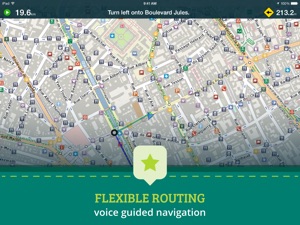
• Online Routing with directions. Save your multi-stop itineraries for offline voice guided navigation!
• Online street address search and contacts integration!
• Did we mention everything is offline? Works anywhere- cities, small towns, even in the middle of nowhere. Never any roaming charges. We dare you to try it!
« For the Traveler »
• Find out about thousands of interesting places - hotels, restaurants, bars, tourist sites, even get metro and public transit info!
• Our super wide area Nearby search is also super fast!
• Have all the travel info you need with more than 25,000 detailed Wikivoyage Travel Guides and more than 1 million Wikipedia articles in 7 languages! All offline of course!
• Customizable Pins and favorites groups! Add notes and mark and share favorite spots!
• Share maps links and your current location!
« For the Adventurer »
• An in-app purchase option offers topographic maps. Get high performance, high accuracy 10m / 50ft contour display world-wide. The ONLY offline app that lets you download large areas, even entire countries! Contours are displayed on our existing maps for all Activities.
• Hiking and Cycling maps! Great for geocaching and getting off the track!
• GPS track recording lets you see what route you took! Great for hikes, cycling and off road! Never get lost again!
• Import/Export support for GPX and CSV files! Share with friends using PE Archives.
• Displays and lets you search for map coordinates in all common formats (including DD, DDM, DMS, MGRS, UTM/UPS, GeoHash, and what3words)!
• Numerous GPS settings for your preferred configuration including compass and heading arrow or rotation, look ahead mode, accuracy and recording settings.
...and much more - so try it out!
« How's it Work? »
Just select the cities, regions, or even whole countries you want to download, and it will be available for offline use, complete with information on thousands of POIs (Points of Interest), and optionally, topographic maps, travel guides and Wikipedia articles.
To learn more about Pocket Earth or the community driven open data sources that we use, please visit our website.
Don’t forget this:
1. Continued use of GPS running in the background can dramatically decrease battery life. Only the GPS Route Navigation and GPS Track Recording features will use the GPS when running in background.
2. This app uses data from the amazing community driven open mapping project called openstreetmap.org! Coverage detail may vary by region, please visit our website to check the map detail for your regions of interest.
3. Does not currently support all asian texts on the map (Chinese, Japanese, etc).

What's New in Version 3.9

This version improves map control with external keyboard support:
• Arrow keys for moving map.
• Plus and minus keys to zoom.
• Spacebar to toggle GPS mode.
You can also now long press on Info Panel to move/zoom map to view selected object.

Seller

Name

GeoMagik LLC

Information

Developer

Categories

Version

3.9

Size

35 MB

Game Center

No

VPP Device Licensing

Yes

Rating

Rated: 4+

Compatibility

iOS 12.0 or later

Devices

iPhone 5s, iPhone 6, iPhone 6 Plus, iPhone 6s, iPhone 6s Plus, iPhone SE, iPhone 7, iPhone 7 Plus, iPhone 8, iPhone 8 Plus, iPhone X, iPhone XR, iPhone XS, iPhone XS Max, iPhone 11, iPhone 11 Pro, iPhone 11 Pro Max, iPhone SE (2nd generation), iPhone 12, iPhone 12 Pro, iPhone 12 Pro Max, iPhone 12 mini, iPhone 13, iPhone 13 Pro, iPhone 13 Pro Max, iPhone 13 mini, iPhone SE (3rd generation), iPhone 14, iPhone 14 Plus, iPhone 14 Pro, iPhone 14 Pro Max, iPhone 15, iPhone 15 Plus, iPhone 15 Pro, iPhone 15 Pro Max, iPhone 16, iPhone 16 Plus, iPhone 16 Pro, iPhone 16 Pro Max, iPhone 16e, iPhone 17, iPhone 17 Pro, iPhone 17 Pro Max, iPhone Air, iPhone 17e, iPad (5th Generation) Wi-Fi, iPad (5th Generation) Wi-Fi + Cellular, iPad (6th generation) Wi-Fi, iPad (6th generation) Wi-Fi + Cellular, iPad Pro, iPad Pro (Cellular), iPad Pro (9.7-inch), iPad Pro (9.7-inch) (Cellular), iPad Pro 12.9-inch (2nd generation), iPad Pro 12.9-inch (2nd generation) Wi-Fi + Cellular, iPad Pro (10.5-inch), iPad Pro (10.5-inch) Wi-Fi + Cellular, iPad Pro (11-inch), iPad Pro (11-inch) Wi-Fi + Cellular, iPad Pro 12.9-inch (3rd generation), iPad Pro 12.9-inch (3rd generation) Wi-Fi + Cellular, iPad Air, iPad Air (Cellular), iPad Air 2, iPad Air 2 (Cellular), iPad Air (3rd generation), iPad Air (3rd generation) Wi-Fi + Cellular, iPad mini Retina, iPad mini Retina (Cellular), iPad mini 3, iPad mini 3 (Cellular), iPad mini 4, iPad mini 4 (Cellular), iPad mini (5th Generation), iPad mini (5th Generation) Wi-Fi + Cellular, iPad (7th generation) Wi-Fi + Cellular, iPad Pro 11-inch (2nd generation), iPad Pro 11-inch (2nd generation) Wi-Fi + Cellular, iPad Pro 12.9-inch (4th generation), iPad Pro 12.9-inch (4th generation) Wi-Fi + Cellular, iPad Air (4th Generation) (Wi-Fi), iPad Air (4th Generation) (Wi-Fi + Cellular), iPad (8th generation) Wi-Fi, iPad (8th generation) Wi-Fi + Cellular, iPad Pro 11-inch (3rd generation), iPad Pro 11-inch (3rd generation) Wi-Fi + Cellular, iPad Pro 12.9-inch (5th Generation), iPad Pro 12.9-inch (5th Generation) Wi-Fi + Cellular, iPad (9th Generation), iPad (9th Generation) Wi-Fi + Cellular, iPad mini (6th Generation), iPad mini (6th Generation) Wi-Fi + Cellular, iPad Air (5th generation), iPad Air (5th generation) Wi-Fi + Cellular, iPad Pro 11-inch (4th generation), iPad Pro 11-inch (4th generation) Wi-Fi + Cellular, iPad Pro 12.9-inch (6th generation), iPad Pro 12.9-inch (6th generation) Wi-Fi + Cellular, iPad (10th generation), iPad (10th generation) Wi-Fi + Cellular, iPad Air 11-inch (M2) Wi-Fi, iPad Air 13-inch (M2) Wi-Fi, iPad Air 13-inch (M2) Wi-Fi + Cellular, iPad Pro 11-inch (M4) Wi-Fi, iPad Pro 11-inch (M4) Wi-Fi + Cellular, iPad Pro 13-inch (M4) Wi-Fi, iPad Pro 13-inch (M4) Wi-Fi + Cellular, iPad mini (A17 Pro) Wi-Fi, iPad mini (A17 Pro) Wi-Fi + Cellular, iPad (A16) Wi-Fi, iPad (A16) Wi-Fi + Cellular, iPad Air 11-inch (M3) Wi-Fi, iPad Air 11-inch (M3) Wi-Fi + Cellular, iPad Air 13-inch (M3) Wi-Fi, iPad Air 13-inch (M3) Wi-Fi + Cellular, iPad Pro 11-inch (M5) Wi-Fi, iPad Pro 11-inch (M5) Wi-Fi + Cellular, iPad Pro 13-inch (M5) Wi-Fi, iPad Pro 13-inch (M5) Wi-Fi + Cellular, iPad Air 11-inch (M4) Wi-Fi, iPad Air 11-inch (M4) Wi-Fi + Cellular, iPad Air 13-inch (M4) Wi-Fi, iPad Air 13-inch (M4) Wi-Fi + Cellular, iPod touch (6th Generation), iPod touch (7th generation)

Languages

English, Czech, Dutch, French, German, Russian, Spanish

App Store: Customer Ratings

Ratings & Reviews

5.0 of 5 (8 Ratings)

App Store: Customer Reviews

2015-11-08

Best offline navigation map

I've used this app for hikes, drives and walk arounds in cities. So far it hasn't let me down and the functions are great and easy to use. A must have app for any traveler
John tan21
Version 3.0