AboutTermsPrivacyContact
 
Updating
PrintCentral Pro for iPhone

PrintCentral Pro for iPhone

Released: 2011-04-14
© 2008-2025, EuroSmartz Ltd
PrintCentral Pro for iPhone - QR Code
Version 6.0
4+
Download on the App Store
Version 6.0
4+
Download on the App Store
Released: 2011-04-14
© 2008-2025, EuroSmartz Ltd

iPhone Screenshots

Screenshot
Screenshot
Screenshot
Screenshot
Screenshot

Description

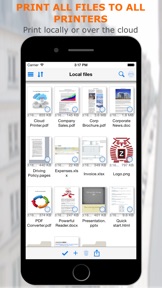
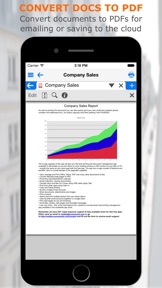
The Ultimate File Management, Transfer and Print solution for the iPhone. Print to ALL printers (Not just AirPrint Printers). View, store & print email, documents & PDFs, all major cloud servers, attachments, photos, contacts & web pages. Convert documents and images to PDF files. Also print from inside other app e.g. Safari, Photos & more
MDM Support - Support for Mobile Device Management multiple app configuration
- Chosen by Apple for "What's Hot" on the App Store
- Featured on the Discovery Channel
MacWorld: "PrintCentral is much more than a printing utility-it is a veritable office center"
AppCraver: "This app will let you print basically anything from basically anywhere."
► Print ALL content to ALL Printers
• Print direct to most existing WiFi or shared printers, or use our free printer/file sharing Mac/PC WePrint software for ALL printers.
• Print to all AirPrint, non-AirPrint & network shared printers
• Print files & other content from other apps
• Print almost anything from your Mac to your iPhone as a PDF file
• Print Preview and print page selection
• Print remotely via mobile data or WiFi
• Choose from a large range of printing options. Copies, Duplex, Grayscale, Image sizes, Page Range, Paper Size, Margins ...
• Save web pages, documents etc. as PDF files
• Bluetooth & Mobile printing using many Brother & Zebra mobile printers. e.g. Brother PJ-673, Zebra iMZ 220 ...
• USB and other printers can be used via free print server software on your Mac/PC
► Complete File & Cloud Server Management/Transfer/Conversion
• The most advanced File Management app available for the iPhone
• Combine all of your Cloud Servers together to Transfer Files between them and other devices
• iCloud, Dropbox, Evernote, Box, FTP, OneDrive, ShareFile, SugarSync, Transporter, WebDAV & More
• Print, Send or fetch files from Other Apps to store centrally
• Secure with an App Password or Finger Touch ID
• Advanced search to find files on local and cloud servers
• Integration with the global device Spotlight Search
• Zip multiple files to send via email or save to a Cloud Server
► Apple Watch
• Print Images and Photos straight from your Apple Watch
• Print from all of your Cloud Servers
• Browse all of your photo albums without syncing beforehand
► WiFi Hard Drive
• Mount your iPhone as a network server on your Mac or PC for quick file transfer
• Send and fetch files from your iPhone to your Mac or PC or Network server
• Drag and drop documents & files between devices
► Transfer Files and Content to computers and other devices
• Send content from other apps to other devices
• Use the built in Bluetooth or WiFi transfer features to quickly and simply send files to another iPad, iPhone, Mac or PC
• Transfer files via WiFi if available, or instantly with Bluetooth
• Copy text or an image from a Web Page and send to another device with a single tap
• Send a phone number, address, photo or other content quickly to a friend
• Drag and drop to move files to other devices
► Emails - Print, Attach files, Save and PDF Convert
• Print emails and attachments
• Attach multiple files and images to new emails
• Supports virtually all email accounts
• Send Cloud and other files as attachments
• Save attachments for archiving or emailing
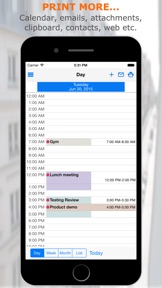
► Complete Calendar Printing
• View and Print by Day/Week/Month
• Choose which calendars to display and print
• Email your calendar views as PDFs
• Print event maps and directions
► Print and Save Web Pages
• Print from Safari
• Copy web and email content from apps to print or convert to PDF
• Save downloaded files from web pages for archiving or emailing
• Send web pages as PDF email attachments
► Photos and Image File Sharing and Transfer
• Move Image/Video Files to your Photo Album
• Move Photos & Image Files to and from your Cloud servers, Mac/PC or another iPad/iPhone
• Print Photos in multiple sizes
► Contacts
• Search & select multiple contacts to print
• View all emails for each contact

What's New in Version 6.0

Support for iOS 26 • One Drive login fix
Support our hard working team - support regular updates and new features with a quick review on the App Store, thanks!

Information

Categories

Version

6.0

Size

64 MB

Game Center

No

VPP Device Licensing

Yes

Rating

Rated: 4+

Compatibility

iOS 12.0 or later

Devices

iPhone 5s, iPhone 6, iPhone 6 Plus, iPhone 6s, iPhone 6s Plus, iPhone SE, iPhone 7, iPhone 7 Plus, iPhone 8, iPhone 8 Plus, iPhone X, iPhone XR, iPhone XS, iPhone XS Max, iPhone 11, iPhone 11 Pro, iPhone 11 Pro Max, iPhone SE (2nd generation), iPhone 12, iPhone 12 Pro, iPhone 12 Pro Max, iPhone 12 mini, iPhone 13, iPhone 13 Pro, iPhone 13 Pro Max, iPhone 13 mini, iPhone SE (3rd generation), iPhone 14, iPhone 14 Plus, iPhone 14 Pro, iPhone 14 Pro Max, iPhone 15, iPhone 15 Plus, iPhone 15 Pro, iPhone 15 Pro Max, iPhone 16, iPhone 16 Plus, iPhone 16 Pro, iPhone 16 Pro Max, iPhone 16e, iPhone 17, iPhone 17 Pro, iPhone 17 Pro Max, iPhone Air, iPad (5th Generation) Wi-Fi, iPad (5th Generation) Wi-Fi + Cellular, iPad (6th generation) Wi-Fi, iPad (6th generation) Wi-Fi + Cellular, iPad Pro, iPad Pro (Cellular), iPad Pro (9.7-inch), iPad Pro (9.7-inch) (Cellular), iPad Pro 12.9-inch (2nd generation), iPad Pro 12.9-inch (2nd generation) Wi-Fi + Cellular, iPad Pro (10.5-inch), iPad Pro (10.5-inch) Wi-Fi + Cellular, iPad Pro (11-inch), iPad Pro (11-inch) Wi-Fi + Cellular, iPad Pro 12.9-inch (3rd generation), iPad Pro 12.9-inch (3rd generation) Wi-Fi + Cellular, iPad Air, iPad Air (Cellular), iPad Air 2, iPad Air 2 (Cellular), iPad Air (3rd generation), iPad Air (3rd generation) Wi-Fi + Cellular, iPad mini Retina, iPad mini Retina (Cellular), iPad mini 3, iPad mini 3 (Cellular), iPad mini 4, iPad mini 4 (Cellular), iPad mini (5th Generation), iPad mini (5th Generation) Wi-Fi + Cellular, iPad (7th generation) Wi-Fi + Cellular, iPad Pro 11-inch (2nd generation), iPad Pro 11-inch (2nd generation) Wi-Fi + Cellular, iPad Pro 12.9-inch (4th generation), iPad Pro 12.9-inch (4th generation) Wi-Fi + Cellular, iPad Air (4th Generation) (Wi-Fi), iPad Air (4th Generation) (Wi-Fi + Cellular), iPad (8th generation) Wi-Fi, iPad (8th generation) Wi-Fi + Cellular, iPad Pro 11-inch (3rd generation), iPad Pro 11-inch (3rd generation) Wi-Fi + Cellular, iPad Pro 12.9-inch (5th Generation), iPad Pro 12.9-inch (5th Generation) Wi-Fi + Cellular, iPad (9th Generation), iPad (9th Generation) Wi-Fi + Cellular, iPad mini (6th Generation), iPad mini (6th Generation) Wi-Fi + Cellular, iPad Air (5th generation), iPad Air (5th generation) Wi-Fi + Cellular, iPad Pro 11-inch (4th generation), iPad Pro 11-inch (4th generation) Wi-Fi + Cellular, iPad Pro 12.9-inch (6th generation), iPad Pro 12.9-inch (6th generation) Wi-Fi + Cellular, iPad (10th generation), iPad (10th generation) Wi-Fi + Cellular, iPad Air 11-inch (M2) Wi-Fi, iPad Air 13-inch (M2) Wi-Fi, iPad Air 13-inch (M2) Wi-Fi + Cellular, iPad Pro 11-inch (M4) Wi-Fi, iPad Pro 11-inch (M4) Wi-Fi + Cellular, iPad Pro 13-inch (M4) Wi-Fi, iPad Pro 13-inch (M4) Wi-Fi + Cellular, iPad mini (A17 Pro) Wi-Fi, iPad mini (A17 Pro) Wi-Fi + Cellular, iPad (A16) Wi-Fi, iPad (A16) Wi-Fi + Cellular, iPad Air 11-inch (M3) Wi-Fi, iPad Air 11-inch (M3) Wi-Fi + Cellular, iPad Air 13-inch (M3) Wi-Fi, iPad Air 13-inch (M3) Wi-Fi + Cellular, iPad Pro 11-inch (M5) Wi-Fi, iPad Pro 11-inch (M5) Wi-Fi + Cellular, iPad Pro 13-inch (M5) Wi-Fi, iPad Pro 13-inch (M5) Wi-Fi + Cellular, iPod touch (6th Generation), iPod touch (7th generation), Apple Watch Series 4

Languages

English, Chinese, French, German, Italian, Japanese, Spanish

App Store: Customer Ratings

Ratings & Reviews

3.0 of 5 (1 Rating)

App Store: Customer Reviews

2016-10-07

LAUNCH SPEED

The iPAD version launch in about 13 seconds in iPAD AIR 2 while iPHONE version took only about 1 seconds in IPHONE 6. The iPAD AIR 2 is more powerful than the iPHONE 6 but took 12 times longer than iPHONE 6 to launch and get ready??? Can't understand even with my technologically advanced mind. WOW!
100%AppsReview
Version 5.0