AboutTermsPrivacyContact
 
Updating
inShort

inShort

Released: 2011-03-09
© 2011 - 2022 Jury Shortki
inShort - QR Code
Version 8.9
4+
Download on the App Store
Version 8.9
4+
Download on the App Store
Released: 2011-03-09
© 2011 - 2022 Jury Shortki

iPhone Screenshots

Screenshot
Screenshot
Screenshot
Screenshot
Screenshot
Screenshot

iPad Screenshots

Screenshot
Screenshot
Screenshot
Screenshot
Screenshot
Screenshot
Screenshot

Description

This application offers a unique approach to project management, which represents your project not just as a plan, but as a coordinated mechanism moving towards the goal.
The original technique allows you to break down project objectives into smaller goals, processes and resources, but not get lost in the details, but always see the overall structure of the project as a whole. After all, project management is not a mechanical observance of the plan, but the achievement of project goals, which should not be overlooked.
The application combines the classic project approach based on Gantt charts and project management through workflow diagrams. As a rule, Gantt charts are ideal for presenting project schedules, but they are not so convenient for reflecting the complex structure of the relationship between processes, goals and resources.
More formally, the program allows you to build a customized, based on the BPMN notation, PERT diagram of the project (with events and processes at nodes). Then this description of the project is used to generate a Gantt chart and track the progress of the project.
So, inShort is a powerful project and business process management tool, which can be applied not only in office but also for personal purposes. You can further explore the capabilities of the program with the detailed interactive User Guide.
Key features of the application: 
• Building the diagram of processes and resources of the project (PERT network diagram of the project, based on BPMN notation). 
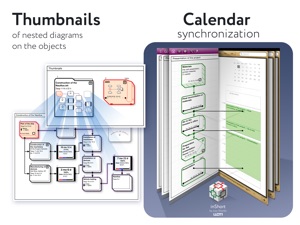
• The ability to drill down the elements of workflow diagrams. 
• Tracking the execution of the project. 
• Integration with the standard Calendar.
• Displaying the list of project tasks in the form of a Gantt chart. 
• Separation of physical and information flows of the project. 
• Ability to specify the expected time of execution, both directly and parametrically.
• Export of charts into PDF files and OPML outlines.
• Project management according to the methodology of the Theory of Constraints. 
• Working calendars taking into account various schedules of work for implementation of tasks. 
• Work resources and their assignment to tasks. 
• Queues of tasks: organize the work with active tasks in accordance with the elements of the GTD methodology.
• Checklists for diagrams — monitor the sequence of actions for project management step by step.
Advanced features of project management in accordance with the Theory of Constraints technique:
• finding the critical path;
• positioning of time buffers of the project;
• calculation of buffer sizes;
• calculation of late starts for feeding paths of the project;
• tracking of time indicators during project execution.
***
inShort Pro — application version for experienced and advanced users, contains advanced and service functions useful for in-depth work with diagrams.
Functions included in inShort Pro:
• Working with layers of diagrams;
• inReview: publications of user diagrams surveys by experienced project managers, indicating successful findings and weaknesses in the diagrams. The procedure for sending diagrams for analysis is described in the Terms of Use.
The inShort Pro version is available by monthly subscription. Subscription automatically renews unless auto-renew is turned off at least 24 hours before the end of the current period.
inShort Pro Subscription Terms of Use link: http://www.shortki.com/inShort/proTerms.html
***
Cannot solve a problem? Draw it inShort and sort things out with it there. It's like voodoo but it works.

What's New in Version 8.9

• Improved compatibility with different versions of iOS.
• Improved stability of the application.

Seller

Name

Iouri Korotkikh

Information

Developer

Categories

Version

8.9

Size

55.6 MB

Game Center

No

VPP Device Licensing

Yes

Rating

Rated: 4+

Compatibility

iOS 9.0 or later

Devices

iPhone 4S, iPhone 5, iPhone 5c, iPhone 5s, iPhone 6, iPhone 6 Plus, iPhone 6s, iPhone 6s Plus, iPhone SE, iPhone 7, iPhone 7 Plus, iPhone 8, iPhone 8 Plus, iPhone X, iPhone XR, iPhone XS, iPhone XS Max, iPhone 11, iPhone 11 Pro, iPhone 11 Pro Max, iPhone SE (2nd generation), iPhone 12, iPhone 12 Pro, iPhone 12 Pro Max, iPhone 12 mini, iPhone 13, iPhone 13 Pro, iPhone 13 Pro Max, iPhone 13 mini, iPhone SE (3rd generation), iPhone 14, iPhone 14 Plus, iPhone 14 Pro, iPhone 14 Pro Max, iPad 2 (Wi-Fi), iPad 2 (3G), iPad (3rd Generation) (Wi-Fi), iPad (3rd Generation) (4G), iPad (4th Generation) (Wi-Fi), iPad (4th Generation) (4G), iPad (5th Generation) Wi-Fi, iPad (5th Generation) Wi-Fi + Cellular, iPad (6th generation) Wi-Fi, iPad (6th generation) Wi-Fi + Cellular, iPad Pro, iPad Pro (Cellular), iPad Pro (9.7-inch), iPad Pro (9.7-inch) (Cellular), iPad Pro 12.9-inch (2nd generation), iPad Pro 12.9-inch (2nd generation) Wi-Fi + Cellular, iPad Pro (10.5-inch), iPad Pro (10.5-inch) Wi-Fi + Cellular, iPad Pro (11-inch), iPad Pro (11-inch) Wi-Fi + Cellular, iPad Pro 12.9-inch (3rd generation), iPad Pro 12.9-inch (3rd generation) Wi-Fi + Cellular, iPad Air, iPad Air (Cellular), iPad Air 2, iPad Air 2 (Cellular), iPad Air (3rd generation), iPad Air (3rd generation) Wi-Fi + Cellular, iPad mini (Wi-Fi), iPad mini (4G), iPad mini Retina, iPad mini Retina (Cellular), iPad mini 3, iPad mini 3 (Cellular), iPad mini 4, iPad mini 4 (Cellular), iPad mini (5th Generation), iPad mini (5th Generation) Wi-Fi + Cellular, iPad (7th generation) Wi-Fi + Cellular, iPad Pro 11-inch (2nd generation), iPad Pro 11-inch (2nd generation) Wi-Fi + Cellular, iPad Pro 12.9-inch (4th generation), iPad Pro 12.9-inch (4th generation) Wi-Fi + Cellular, iPad Air (4th Generation) (Wi-Fi), iPad Air (4th Generation) (Wi-Fi + Cellular), iPad (8th generation) Wi-Fi, iPad (8th generation) Wi-Fi + Cellular, iPad Pro 11-inch (3rd generation), iPad Pro 11-inch (3rd generation) Wi-Fi + Cellular, iPad Pro 12.9-inch (5th Generation), iPad Pro 12.9-inch (5th Generation) Wi-Fi + Cellular, iPad (9th Generation), iPad (9th Generation) Wi-Fi + Cellular, iPad mini (6th Generation), iPad mini (6th Generation) Wi-Fi + Cellular, iPad Air (5th generation), iPad Air (5th generation) Wi-Fi + Cellular, iPad Pro 11-inch (4th generation), iPad Pro 11-inch (4th generation) Wi-Fi + Cellular, iPad Pro 12.9-inch (6th generation), iPad Pro 12.9-inch (6th generation) Wi-Fi + Cellular, iPad (10th generation), iPad (10th generation) Wi-Fi + Cellular, iPod touch (5th generation), iPod touch (6th Generation), iPod touch (7th generation), Apple Watch Series 4, Apple Watch Series 5, Apple Watch Series 6 (GPS), Apple Watch Series 6 (GPS + Cellular), Apple Watch Series SE (GPS), Apple Watch Series SE (GPS + Cellular), Apple Watch Series 7 (GPS), Apple Watch Series 7 (GPS + Cellular), Apple Watch Series 8 (GPS), Apple Watch Series 8 (GPS + Cellular), Apple Watch SE (2nd generation) (GPS), Apple Watch SE (2nd generation) (GPS + Cellular), Apple Watch Ultra

Languages

English, Chinese, French, German, Russian

App Store: Customer Ratings

Ratings & Reviews

5.0 of 5 (1 Rating)

App Store: Customer Reviews

2021-08-23

Excellent tool for Planning

Great tool to create business plans and strategy.
coverpage sg
Version 8.3
2011-09-03

Crashes after User Guide

Need a fix. Crashes everytime I click on something at desktop and menu bar.
binchan123
Version 2.2.2