AboutTermsPrivacyContact
 
Updating
Ghost Hunter M2

Ghost Hunter M2

Released: 2010-10-20
© Michael Weber
Ghost Hunter M2 - QR Code
Version 8.2.3
9+
Download on the App Store
Version 8.2.3
9+
Download on the App Store
Released: 2010-10-20
© Michael Weber

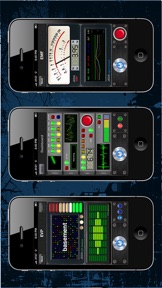
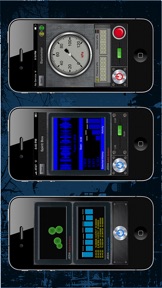
iPhone Screenshots

Screenshot
Screenshot
Screenshot
Screenshot
Screenshot

Description

*The #1 Paranormal Investigation Toolkit*
*Featured on "The Tonight Show" with Selena Gomez and Jimmy Fallon*
Developed by a team of professional engineers, we believe © Ghost Hunter M2 to be the most advanced paranormal investigation toolkit available.
© Ghost Hunter M2 is an advanced, yet very easy to use, paranormal investigation toolkit. Don't let the advanced feature set intimidate you, this toolkit has been specially designed for both the advanced and novice paranormal investigator.
Disclaimer: This toolkit is designed to aid you, the paranormal investigator, in the identification of unexplained phenomena. However, as advanced as this toolkit is, it cannot prove, or disprove, the existence of the paranormal. As a result, this toolkit is provided for entertainment purposes only. We are not responsible for the use, misuse, or interpretation of this software. Please use responsibly.
Please enjoy and Happy hunting!
Visit us on Facebook!
www.facebook.com/GhostHunterM2App
Features:
EMF Instrument
The EMF instrument uses the your device's magnetometer to measure fluctuations in the surrounding magnetic fields.
Audio Detection Instrument
The Audio Detection Instrument utilizes your device's acoustic to electric traducer system, driven by extremely powerful algorithms, to analyze complex audio signals.
FFT-V Instrument
The Fast Fourier Transform Visualizer utilizes your device's acoustic to electric transducer system, driven by powerful algorithms, to analyze complex audio signals.
Geoscope Instrument
Using an advanced triple-axis redundancy filter and your device's electro-mechanical sensor array, the Geoscope instrument has the ability to magnify even the slightest terrainial, and sub-terrainial fluctuations.
Spatial Displacement Instrument
The Spatial Displacement instrument uses a powerful, and proprietary, algorithm to analyze the data presented by the system's electro-mechanical sensor array.
Twilight
The Twilight instrument uses several complex image filtering algorithms to enhance the video imaging produced by the device's camera.
EVP Instrument
The EVP instrument presents words, in both audio and visual format, based on an advanced and proprietary algorithm.
Barometer Instrument
The Barometer instrument uses a powerful, and proprietary, algorithm to analyze the data presented your device’s advanced barometric sensor array.
*Available on iPhone 6 and up.
Luxscope Instrument
The Luxscope instrument uses your device's advanced light sensor array to measure extremely subtle changes in the environment's illuminance.
Please contact us at Jedasoftwarehelp@gmail.com for any questions, comments, concerns, etc. that you may have.

What's New in Version 8.2.3

Bug fixes

Seller

Name

Michael Weber

URL

Information

Developer

Categories

Version

8.2.3

Size

62.4 MB

Game Center

No

VPP Device Licensing

Yes

Rating

Rated 9+ for the following:
Infrequent/Mild Horror/Fear Themes

Compatibility

iOS 12.4 or later

Devices

iPhone 5s, iPhone 6, iPhone 6 Plus, iPhone 6s, iPhone 6s Plus, iPhone SE, iPhone 7, iPhone 7 Plus, iPhone 8, iPhone 8 Plus, iPhone X, iPhone XR, iPhone XS, iPhone XS Max, iPhone 11, iPhone 11 Pro, iPhone 11 Pro Max, iPhone SE (2nd generation), iPhone 12, iPhone 12 Pro, iPhone 12 Pro Max, iPhone 12 mini, iPhone 13, iPhone 13 Pro, iPhone 13 Pro Max, iPhone 13 mini, iPhone SE (3rd generation), iPhone 14, iPhone 14 Plus, iPhone 14 Pro, iPhone 14 Pro Max, iPad (5th Generation) Wi-Fi, iPad (5th Generation) Wi-Fi + Cellular, iPad (6th generation) Wi-Fi, iPad (6th generation) Wi-Fi + Cellular, iPad Pro, iPad Pro (Cellular), iPad Pro (9.7-inch), iPad Pro (9.7-inch) (Cellular), iPad Pro 12.9-inch (2nd generation), iPad Pro 12.9-inch (2nd generation) Wi-Fi + Cellular, iPad Pro (10.5-inch), iPad Pro (10.5-inch) Wi-Fi + Cellular, iPad Pro (11-inch), iPad Pro (11-inch) Wi-Fi + Cellular, iPad Pro 12.9-inch (3rd generation), iPad Pro 12.9-inch (3rd generation) Wi-Fi + Cellular, iPad Air, iPad Air (Cellular), iPad Air 2, iPad Air 2 (Cellular), iPad Air (3rd generation), iPad Air (3rd generation) Wi-Fi + Cellular, iPad mini Retina, iPad mini Retina (Cellular), iPad mini 3, iPad mini 3 (Cellular), iPad mini 4, iPad mini 4 (Cellular), iPad mini (5th Generation), iPad mini (5th Generation) Wi-Fi + Cellular, iPad (7th generation) Wi-Fi + Cellular, iPad Pro 11-inch (2nd generation), iPad Pro 11-inch (2nd generation) Wi-Fi + Cellular, iPad Pro 12.9-inch (4th generation), iPad Pro 12.9-inch (4th generation) Wi-Fi + Cellular, iPad Air (4th Generation) (Wi-Fi), iPad Air (4th Generation) (Wi-Fi + Cellular), iPad (8th generation) Wi-Fi, iPad (8th generation) Wi-Fi + Cellular, iPad Pro 11-inch (3rd generation), iPad Pro 11-inch (3rd generation) Wi-Fi + Cellular, iPad Pro 12.9-inch (5th Generation), iPad Pro 12.9-inch (5th Generation) Wi-Fi + Cellular, iPad (9th Generation), iPad (9th Generation) Wi-Fi + Cellular, iPad mini (6th Generation), iPad mini (6th Generation) Wi-Fi + Cellular, iPad Air (5th generation), iPad Air (5th generation) Wi-Fi + Cellular, iPad Pro 11-inch (4th generation), iPad Pro 11-inch (4th generation) Wi-Fi + Cellular, iPad Pro 12.9-inch (6th generation), iPad Pro 12.9-inch (6th generation) Wi-Fi + Cellular, iPad (10th generation), iPad (10th generation) Wi-Fi + Cellular, iPod touch (6th Generation), iPod touch (7th generation)

Languages

English

App Store: Customer Ratings

Ratings & Reviews

4.0 of 5 (3 Ratings)

App Store: Customer Reviews

2013-05-18

Effective

This app is efficient. Results are accurate except for EVP which i dont think is real.
For the dashboard, hope that all activity recorded could be save for playback.
Remino™
Version 4.1.2