AboutTermsPrivacyContact
 
Updating
Perfect OCR

Perfect OCR

Released: 2010-03-22
© Piksoft 2017
Perfect OCR - QR Code
Version 2.4.3
4+
Download on the App Store
Version 2.4.3
4+
Download on the App Store
Released: 2010-03-22
© Piksoft 2017

iPhone Screenshots

Screenshot
Screenshot
Screenshot
Screenshot
Screenshot

Description

Perfect OCR gives you both an accurate general purpose OCR app and a quality document scanner. Now you can scan and OCR your letter-size or A4 documents with an accuracy of 90% or more, edit, copy and store the recognized text, and e-mail your documents as PDF files with text, SINGLE page image, or both together!
NOTE: To ensure the advertised results it is important that you follow the OCR TIPS below (or in the app's help).
"It worked great for me! I translated a whole story in spanish using the espanol language preference and then I copied and pasted it into a translator to get the whole story in English!"
"This app is really very good and I find it to be very accurate!"
>> Perfect OCR users.
Perfect OCR scans your documents using advanced image-processing algorithms to eliminate uneven lighting and shadows and improve contrast. The result is the clearest and most readable scans possible from the iPhone's camera. Perfect OCR also offers SureScan, our proprietary scanning mode that delivers sharper images with less jitter or smear.
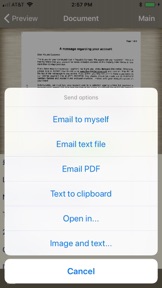
Our unique "Email to myself" feature lets you send documents to a predefined address, or even upload them to an online storage service like Evernote or Box.net, with a single tap. Uploading documents to online services via email is fast, secure, and can be done even if you're temporarily off line. Refer to app help for details.
All processing happens on your iPhone, and the confidentiality of your data is never compromised. There is also no subscription fee, and no Internet access is needed to scan documents or run OCR.
PERFECT OCR FEATURES:
• Letter-size or A4 page OCR with accuracy of 95% for model 3GS, 98% for iPhone 4, and up to 90% for 3G
• OCR languages: English, French, Spanish, German, Dutch, Italian, Portuguese, Swedish, Russian, Polish, Hungarian, Czech and Ukrainian.
• Email multipage PDFs with text, SINGLE page image, or both
• Automatic document edge detection and perspective correction
• Multipage text recognition with accuracy indicator
• Text editing and copy-to-clipboard operations
• Built-in OCR text archive with file sharing via iTunes
• "Email to myself" feature
• Email text and image files (.TXT + .JPG), or save image to library
• Searchable PDFs with document images (single page)
• Preserves simple text formatting
• Option to auto-remove line breaks
• SureScan mode for jitter-free scans
• Simple yet powerful user interface
• Instant brightness, rotation, and color controls
• Compact attachments with adjustable size
IMPORTANT TIPS FOR OCR:
• Make sure your document is flat and well lit. Hold your iPhone still while shooting.
• Always scan documents using "SureScan 3x" mode.
• Glossy paper may not work well (avoid glare).
• When scanning books keep the pages as flat as possible and your iPhone parallel to the surface.
• Perfect OCR cannot recognize handwritten, very large text or spreadsheets correctly.
• Make sure to select the right language for OCR in app settings.
We're constantly improving Perfect OCR, and we value our customers' opinions and feedback. Please contact us at support@turboscanapp.com. If you have a problem with our software, please contact us before submitting a comment to the app store. We can solve most of the problems, but we cannot respond to comments.

What's New in Version 2.4.3

This app has been updated by Apple to display the Apple Watch app icon.
Email composer button color issue is fixed.
Added four more OCR languages: Polish, Hungarian, Czech and Ukrainian.
Cosmetic improvements.

Seller

Name

Piksoft Inc.

URL

Information

Developer

Categories

Version

2.4.3

Size

37.8 MB

Game Center

No

VPP Device Licensing

Yes

Rating

Rated: 4+

Compatibility

iOS 8.0 or later

Devices

iPhone 4S, iPhone 5, iPhone 5c, iPhone 5s, iPhone 6, iPhone 6 Plus, iPhone 6s, iPhone 6s Plus, iPhone SE, iPhone 7, iPhone 7 Plus, iPhone 8, iPhone 8 Plus, iPhone X, iPhone XR, iPhone XS, iPhone XS Max, iPhone 11, iPhone 11 Pro, iPhone 11 Pro Max, iPhone SE (2nd generation), iPhone 12, iPhone 12 Pro, iPhone 12 Pro Max, iPhone 12 mini, iPhone 13, iPhone 13 Pro, iPhone 13 Pro Max, iPhone 13 mini, iPhone SE (3rd generation), iPhone 14, iPhone 14 Plus, iPhone 14 Pro, iPhone 14 Pro Max, iPad 2 (Wi-Fi), iPad 2 (3G), iPad (3rd Generation) (Wi-Fi), iPad (3rd Generation) (4G), iPad (4th Generation) (Wi-Fi), iPad (4th Generation) (4G), iPad (5th Generation) Wi-Fi, iPad (5th Generation) Wi-Fi + Cellular, iPad (6th generation) Wi-Fi, iPad (6th generation) Wi-Fi + Cellular, iPad Pro, iPad Pro (Cellular), iPad Pro (9.7-inch), iPad Pro (9.7-inch) (Cellular), iPad Pro 12.9-inch (2nd generation), iPad Pro 12.9-inch (2nd generation) Wi-Fi + Cellular, iPad Pro (10.5-inch), iPad Pro (10.5-inch) Wi-Fi + Cellular, iPad Pro (11-inch), iPad Pro (11-inch) Wi-Fi + Cellular, iPad Pro 12.9-inch (3rd generation), iPad Pro 12.9-inch (3rd generation) Wi-Fi + Cellular, iPad Air, iPad Air (Cellular), iPad Air 2, iPad Air 2 (Cellular), iPad Air (3rd generation), iPad Air (3rd generation) Wi-Fi + Cellular, iPad mini (Wi-Fi), iPad mini (4G), iPad mini Retina, iPad mini Retina (Cellular), iPad mini 3, iPad mini 3 (Cellular), iPad mini 4, iPad mini 4 (Cellular), iPad mini (5th Generation), iPad mini (5th Generation) Wi-Fi + Cellular, iPad (7th generation) Wi-Fi + Cellular, iPad Pro 11-inch (2nd generation), iPad Pro 11-inch (2nd generation) Wi-Fi + Cellular, iPad Pro 12.9-inch (4th generation), iPad Pro 12.9-inch (4th generation) Wi-Fi + Cellular, iPad Air (4th Generation) (Wi-Fi), iPad Air (4th Generation) (Wi-Fi + Cellular), iPad (8th generation) Wi-Fi, iPad (8th generation) Wi-Fi + Cellular, iPad Pro 11-inch (3rd generation), iPad Pro 11-inch (3rd generation) Wi-Fi + Cellular, iPad Pro 12.9-inch (5th Generation), iPad Pro 12.9-inch (5th Generation) Wi-Fi + Cellular, iPad (9th Generation), iPad (9th Generation) Wi-Fi + Cellular, iPad mini (6th Generation), iPad mini (6th Generation) Wi-Fi + Cellular, iPad Air (5th generation), iPad Air (5th generation) Wi-Fi + Cellular, iPad Pro 11-inch (4th generation), iPad Pro 11-inch (4th generation) Wi-Fi + Cellular, iPad Pro 12.9-inch (6th generation), iPad Pro 12.9-inch (6th generation) Wi-Fi + Cellular, iPad (10th generation), iPad (10th generation) Wi-Fi + Cellular, iPod touch (5th generation), iPod touch (6th Generation), iPod touch (7th generation), Apple Watch Series 4, Apple Watch Series 5, Apple Watch Series 6 (GPS), Apple Watch Series 6 (GPS + Cellular), Apple Watch Series SE (GPS), Apple Watch Series SE (GPS + Cellular), Apple Watch Series 7 (GPS), Apple Watch Series 7 (GPS + Cellular), Apple Watch Series 8 (GPS), Apple Watch Series 8 (GPS + Cellular), Apple Watch SE (2nd generation) (GPS), Apple Watch SE (2nd generation) (GPS + Cellular), Apple Watch Ultra

Languages

English, Russian

App Store: Customer Ratings

Ratings & Reviews

4.0 of 5 (1 Rating)

App Store: Customer Reviews

2015-04-19

Most accurate!

Most accurate OCR for IOS so far. If they only made an iPad version.
Ad C
Version 2.4.1
2012-07-20

The Best OCR

It is very useful in research!
John Smith West
Version 2.4.1
2011-02-06

Perfect

Premium but it delivers. Fast and accurate; about 95% success.
amigokawan
Version 2.3
2010-05-15

Perfect OCR

does not work
alanlek01