AboutTermsPrivacyContact
 
Updating
Filer

Filer

Released: 2009-06-16
© 2009-2016 Dan Leehr LLC
Filer - QR Code
Version 3.1.1
17+
Download on the App Store
Version 3.1.1
17+
Download on the App Store
Released: 2009-06-16
© 2009-2016 Dan Leehr LLC

iPhone Screenshots

Screenshot
Screenshot
Screenshot
Screenshot
Screenshot

iPad Screenshots

Screenshot
Screenshot
Screenshot
Screenshot
Screenshot

Description

64-bit, optimized for all the latest devices
Designed for iPad, iPhone, and iPod Touch.
Dropbox and WebDAV, Background Downloads, and More
"The very best app to help you download your files is called Filer." - appadvice.com
-------- Overview --------
Get your files anywhere!
Filer is a unique application for iOS devices that lets you manage, view, and share your files. You can get your files on the go when you do have a network connection, and view them when you don't.
-------- Features --------
File Manager:
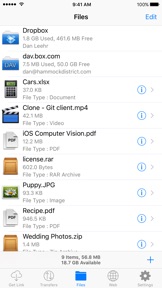
* Clean UI with full featured File/Folder browser
* Save files from other iOS apps - Use Filer to extract ZIP/RAR/TAR/Gzip Archives from any app that makes them available
* Open files into other apps like iBooks, Pages, Numbers, Keynote.
* Full-screen Quick-Look
* Document Viewer features Page controls and quick slider
* Enhanced media playback
* iTunes USB File Sharing: Quickly drag and drop files between your device and Mac/PC
* Save Photos to Device Photo Album
* Move/Delete Multiple Files/Folders at once
Multitasking:
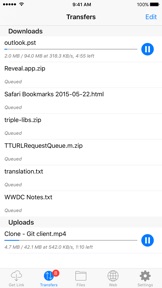
* Uploads/Downloads continue in the background
* Fast App Switching
* Background Audio Playback
* Background Compress and Extraction
* App Badge shows transfer count
Dropbox and WebDAV:
- Connect to a server and upload/download/manage files
- Sync what you want, keep files on your device
Archive Support:
- Unarchive RAR, ZIP, TAR, and Gzip Archives.
- Unarchive multi-part RAR Archives
- Compress Files/Folders to ZIP
Downloading:
- Download and save files to your device
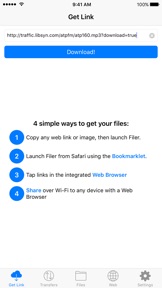
- Monitor/Manage downloads in graphical queue with progress, speed, and time remaining
- Pause/Resume downloads, quit/relaunch the app and resume
- Auto-Download Option
- Smart Download to handle complex redirects
Web Browser:
- Download Mode to Download any link you tap
- Fully featured Bookmark and Bookmarklet function
- HTTP Auth and Self-Signed SSL Support
- Tap-and-Hold links for additional options
File Viewing:
- AirPlay Video support
- Viewing of all document/media types viewable by iOS
- HDMI and VGA Out for Video Files
- Scroll Bar to quickly jump anywhere in long documents
- Documents, audio, and video files remember where you left off
- Photo Slideshows
- Source Code color-coding
Sharing:
- Email files from Filer (Under 15MB)
- Save Photos/Videos to Device photo album where other apps can use them
- Web Sharing, optimized for Downloading
- iTunes USB Sharing
- Dropbox upload and download
Misc:
- Bookmarklet for Safari lets you launch Filer with the current page address
- Built-in help files
- Passcode Lock to protect your data
---- Customer Testimonials (Downloader) -----
Ha! - "This is awesome...this program has eliminated about 80 percent of my need for tethering, I'm very excited about that."
Very useful app and thorough! - "This is a Huge time-saver, allowing me to grab large PDF files without having to re-download every time"
Perfect - "Great app that adds functionality sorely missing from Safari"
Amazing App - "I don't know how I did without it!"
-------- Press --------
+ Awarded "Essential App" from appadvice.com
+ "There are many file utility applications for mobile devices, but the Downloader app pairs a fully-featured program with an integrated web browser, making it super-easy to use." - SmokinApps.com
+ Awarded "Better" Rating from AppReview.com
-------- Notes --------
+ Filer is rated 17+ due to web access through the integrated browser.
-------- Support --------
For support, please visit the support link. We have no way to respond to App Store reviews.

What's New in Version 3.1.1

This app has been updated by Apple to display the Apple Watch app icon.
Fixes a first-time launch issue on iPad

Seller

Name

Dan Leehr L.L.C.

Information

Categories

Version

3.1.1

Size

9.4 MB

Game Center

No

VPP Device Licensing

Yes

Rating

Rated 17+ for the following:
Unrestricted Web Access

Compatibility

iOS 8.0 or later

Devices

iPhone 4S, iPhone 5, iPhone 5c, iPhone 5s, iPhone 6, iPhone 6 Plus, iPhone 6s, iPhone 6s Plus, iPhone SE, iPhone 7, iPhone 7 Plus, iPhone 8, iPhone 8 Plus, iPhone X, iPhone XR, iPhone XS, iPhone XS Max, iPhone 11, iPhone 11 Pro, iPhone 11 Pro Max, iPhone SE (2nd generation), iPhone 12, iPhone 12 Pro, iPhone 12 Pro Max, iPhone 12 mini, iPhone 13, iPhone 13 Pro, iPhone 13 Pro Max, iPhone 13 mini, iPhone SE (3rd generation), iPhone 14, iPhone 14 Plus, iPhone 14 Pro, iPhone 14 Pro Max, iPad 2 (Wi-Fi), iPad 2 (3G), iPad (3rd Generation) (Wi-Fi), iPad (3rd Generation) (4G), iPad (4th Generation) (Wi-Fi), iPad (4th Generation) (4G), iPad (5th Generation) Wi-Fi, iPad (5th Generation) Wi-Fi + Cellular, iPad (6th generation) Wi-Fi, iPad (6th generation) Wi-Fi + Cellular, iPad Pro, iPad Pro (Cellular), iPad Pro (9.7-inch), iPad Pro (9.7-inch) (Cellular), iPad Pro 12.9-inch (2nd generation), iPad Pro 12.9-inch (2nd generation) Wi-Fi + Cellular, iPad Pro (10.5-inch), iPad Pro (10.5-inch) Wi-Fi + Cellular, iPad Pro (11-inch), iPad Pro (11-inch) Wi-Fi + Cellular, iPad Pro 12.9-inch (3rd generation), iPad Pro 12.9-inch (3rd generation) Wi-Fi + Cellular, iPad Air, iPad Air (Cellular), iPad Air 2, iPad Air 2 (Cellular), iPad Air (3rd generation), iPad Air (3rd generation) Wi-Fi + Cellular, iPad mini (Wi-Fi), iPad mini (4G), iPad mini Retina, iPad mini Retina (Cellular), iPad mini 3, iPad mini 3 (Cellular), iPad mini 4, iPad mini 4 (Cellular), iPad mini (5th Generation), iPad mini (5th Generation) Wi-Fi + Cellular, iPad (7th generation) Wi-Fi + Cellular, iPad Pro 11-inch (2nd generation), iPad Pro 11-inch (2nd generation) Wi-Fi + Cellular, iPad Pro 12.9-inch (4th generation), iPad Pro 12.9-inch (4th generation) Wi-Fi + Cellular, iPad Air (4th Generation) (Wi-Fi), iPad Air (4th Generation) (Wi-Fi + Cellular), iPad (8th generation) Wi-Fi, iPad (8th generation) Wi-Fi + Cellular, iPad Pro 11-inch (3rd generation), iPad Pro 11-inch (3rd generation) Wi-Fi + Cellular, iPad Pro 12.9-inch (5th Generation), iPad Pro 12.9-inch (5th Generation) Wi-Fi + Cellular, iPad (9th Generation), iPad (9th Generation) Wi-Fi + Cellular, iPad mini (6th Generation), iPad mini (6th Generation) Wi-Fi + Cellular, iPad Air (5th generation), iPad Air (5th generation) Wi-Fi + Cellular, iPad Pro 11-inch (4th generation), iPad Pro 11-inch (4th generation) Wi-Fi + Cellular, iPad Pro 12.9-inch (6th generation), iPad Pro 12.9-inch (6th generation) Wi-Fi + Cellular, iPad (10th generation), iPad (10th generation) Wi-Fi + Cellular, iPod touch (5th generation), iPod touch (6th Generation), iPod touch (7th generation), Apple Watch Series 4, Apple Watch Series 5, Apple Watch Series 6 (GPS), Apple Watch Series 6 (GPS + Cellular), Apple Watch Series SE (GPS), Apple Watch Series SE (GPS + Cellular), Apple Watch Series 7 (GPS), Apple Watch Series 7 (GPS + Cellular), Apple Watch Series 8 (GPS), Apple Watch Series 8 (GPS + Cellular), Apple Watch SE (2nd generation) (GPS), Apple Watch SE (2nd generation) (GPS + Cellular), Apple Watch Ultra

Languages

English

App Store: Customer Ratings

Ratings & Reviews

1.0 of 5 (1 Rating)

App Store: Customer Reviews

2021-04-23

Could not the app

I have purchased the app, but I could not open in my apple phone. Could you help?
STvv
Version 3.1.1
2012-12-31

Filer Got Problem

Reason Cannot Installed Or Update ??? My Are Ipad One The Old Version ??? What Are The Problem ??? Please Help Me Thank U , Always Say Cannot Download From Our Country ??? Why ???
Cyberjames
Version 2.2.0
2011-06-12

It downloads

Bought this app 8 months ago, but never really figured out what it does until today!
It downloads files from the internet onto the iPhone, and it does it well :)
Siddhartha Mohana Adhiroha
Version 2.1.2