AboutTermsPrivacyContact
 
Updating
aSmart HUD

aSmart HUD

Released: 2009-02-06
© Atoll Ordenadores, 2011
aSmart HUD - QR Code
Version 11.5
4+
Download on the App Store
Version 11.5
4+
Download on the App Store
Released: 2009-02-06
© Atoll Ordenadores, 2011

iPhone Screenshots

Screenshot
Screenshot
Screenshot
Screenshot
Screenshot
Screenshot

Description

aSmartHUD is simple and clear vehicle digital dashboard featured by
- HUD mode
- SHORT-TERM WEATHER FORECAST
- IPOD MUSIC PLAYLIST CONTROL
- PHOTO CAMERA WITH IMAGE MARKING
- ADJUSTABLE TRANSPARENCY APPLE MAPS SCREEN
It visualizes your
- current speed,
- average speed,
- current time,
- elapsed trip time,
- heading,
- altitude,
- trip elapsed time,
- distance/time/direction to home location,
- weather forecast for nearest 48 hours the with 3-hour time interval,
- direct distance (kilometers, miles, nautical miles supported) to the starting point of your trip.
- maximum reached speed, altitude and distance to start point, for the current trip and all the trips your ever did.
Comparing with others HUD displays on the market - better look and more features for no price.
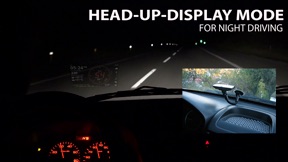
Tapping the "HUD" icon mirrors all the text, so if you position the iPhone horizontally under your car's windscreen you can see perfectly readable half-transparent reflection of the picture displayed. We love this mode! We found it much more convenient compared to traditional car dashboards (especially on the roads of Western Europe, which are full of speed cameras and where you need to watch your speedometer all the time). And last but not the least - it just looks cool. 
Note: this mode works pretty well at night time and twilight, but on direct sunlight the screen brightness can be insufficient.
- "aSmart HUD" can keep track on 4 speed limits, giving a warning (sound and visual) each time you crossing it. Normally, it's legal speed limits within cities, local roads and high-speed motorways. "Never exceed speed" is the speed you should not exceed under any conditions. For example, it can be a technical limit of your vehicle or the point where government can arrest your driving license.
- You can skip/rewind/play/pause your current iPod music track, select the playlist or set the Shuffle or Repeat iPod mode.
- Weather forecast time intervals and temperature units (C, F) are selectable in Preferences.
- You can quickly take a photo of what's going on the road. Photo will be automatically saved into the Photos Album. The speedometer image, map and a some of other useful information will be placed over your photo.
- Landscape and Portrait screen layouts support.
- Three different compass styles, sound themes, colors, etc.
- 4 functionally different display themes.
- Speed history log chart.
- "Location Info" - longitude and latitude, GPS measurement precision and some more data.
- "Records" screen (left upper button on the "Location Info" screen), where you can see your maximum reached speed (during the current trip or all of your trips), maximum altitude and maximum distance from start.
- Tap the speed indicator to switch into speed fullscreen mode.
IMPORTANT: for more screenshots and details visit the http://atoll-ordenadores.com website
Limitations
- The precision is affected by the satellite signal quality. If unsure, use the program only for reference, don't rely on it for 100%. Application requires real A-GPS chip - so, no iPod and not-3G iPad supported. On iPad 3G application function only in "double pixel" mode.
Thanks to everyone for your suggestions about additional functionality! THE BEST AND FASTEST WAY TO CONTACT US IS SENDING YOUR REQUESTS AND BUG REPORTS to support@atoll-ordenadores.com. WE ARE REALLY INTERESTED IN DIALOG, what is not possible when you leaving the bug-report as AppStore review.

What's New in Version 11.5

11.5:
- Several small bugfixes and improvements;
- Tested for latest iOS 12 version;

Seller

Name

Vitalijs Lennojs

Information

Categories

Version

11.5

Size

8.2 MB

Game Center

No

VPP Device Licensing

Yes

Rating

Rated: 4+

Compatibility

iOS 9.1 or later

Devices

iPhone 4S, iPhone 5, iPhone 5c, iPhone 5s, iPhone 6, iPhone 6 Plus, iPhone 6s, iPhone 6s Plus, iPhone SE, iPhone 7, iPhone 7 Plus, iPhone 8, iPhone 8 Plus, iPhone X, iPhone XR, iPhone XS, iPhone XS Max, iPhone 11, iPhone 11 Pro, iPhone 11 Pro Max, iPhone SE (2nd generation), iPhone 12, iPhone 12 Pro, iPhone 12 Pro Max, iPhone 12 mini, iPhone 13, iPhone 13 Pro, iPhone 13 Pro Max, iPhone 13 mini, iPhone SE (3rd generation), iPhone 14, iPhone 14 Plus, iPhone 14 Pro, iPhone 14 Pro Max, iPad 2 (Wi-Fi), iPad 2 (3G), iPad (3rd Generation) (Wi-Fi), iPad (3rd Generation) (4G), iPad (4th Generation) (Wi-Fi), iPad (4th Generation) (4G), iPad (5th Generation) Wi-Fi, iPad (5th Generation) Wi-Fi + Cellular, iPad (6th generation) Wi-Fi, iPad (6th generation) Wi-Fi + Cellular, iPad Pro, iPad Pro (Cellular), iPad Pro (9.7-inch), iPad Pro (9.7-inch) (Cellular), iPad Pro 12.9-inch (2nd generation), iPad Pro 12.9-inch (2nd generation) Wi-Fi + Cellular, iPad Pro (10.5-inch), iPad Pro (10.5-inch) Wi-Fi + Cellular, iPad Pro (11-inch), iPad Pro (11-inch) Wi-Fi + Cellular, iPad Pro 12.9-inch (3rd generation), iPad Pro 12.9-inch (3rd generation) Wi-Fi + Cellular, iPad Air, iPad Air (Cellular), iPad Air 2, iPad Air 2 (Cellular), iPad Air (3rd generation), iPad Air (3rd generation) Wi-Fi + Cellular, iPad mini (Wi-Fi), iPad mini (4G), iPad mini Retina, iPad mini Retina (Cellular), iPad mini 3, iPad mini 3 (Cellular), iPad mini 4, iPad mini 4 (Cellular), iPad mini (5th Generation), iPad mini (5th Generation) Wi-Fi + Cellular, iPad (7th generation) Wi-Fi + Cellular, iPad Pro 11-inch (2nd generation), iPad Pro 11-inch (2nd generation) Wi-Fi + Cellular, iPad Pro 12.9-inch (4th generation), iPad Pro 12.9-inch (4th generation) Wi-Fi + Cellular, iPad Air (4th Generation) (Wi-Fi), iPad Air (4th Generation) (Wi-Fi + Cellular), iPad (8th generation) Wi-Fi, iPad (8th generation) Wi-Fi + Cellular, iPad Pro 11-inch (3rd generation), iPad Pro 11-inch (3rd generation) Wi-Fi + Cellular, iPad Pro 12.9-inch (5th Generation), iPad Pro 12.9-inch (5th Generation) Wi-Fi + Cellular, iPad (9th Generation), iPad (9th Generation) Wi-Fi + Cellular, iPad mini (6th Generation), iPad mini (6th Generation) Wi-Fi + Cellular, iPad Air (5th generation), iPad Air (5th generation) Wi-Fi + Cellular, iPad Pro 11-inch (4th generation), iPad Pro 11-inch (4th generation) Wi-Fi + Cellular, iPad Pro 12.9-inch (6th generation), iPad Pro 12.9-inch (6th generation) Wi-Fi + Cellular, iPad (10th generation), iPad (10th generation) Wi-Fi + Cellular, iPod touch (5th generation), iPod touch (6th Generation), iPod touch (7th generation), Apple Watch Series 4, Apple Watch Series 5, Apple Watch Series 6 (GPS), Apple Watch Series 6 (GPS + Cellular), Apple Watch Series SE (GPS), Apple Watch Series SE (GPS + Cellular), Apple Watch Series 7 (GPS), Apple Watch Series 7 (GPS + Cellular), Apple Watch Series 8 (GPS), Apple Watch Series 8 (GPS + Cellular), Apple Watch SE (2nd generation) (GPS), Apple Watch SE (2nd generation) (GPS + Cellular), Apple Watch Ultra

Languages

English

App Store: Customer Ratings

Ratings & Reviews

1.0 of 5 (1 Rating)

App Store: Customer Reviews

2009-09-12

It doesn't work at all

I m not sure why there isn't any information displayed even when my car is moving off for half an hour. Nothing coming out! Crap app.
KiaKoup77