AboutTermsPrivacyContact
 
Updating
a-Shell

a-Shell

Released: 2019-10-25
© Nicolas Holzschuch
a-Shell - QR Code
Version 1.10.1
17+
Download on the App Store
Version 1.10.1
17+
Download on the App Store
Released: 2019-10-25
© Nicolas Holzschuch

iPhone Screenshots

Screenshot
Screenshot
Screenshot
Screenshot
Screenshot

iPad Screenshots

Screenshot
Screenshot
Screenshot
Screenshot
Screenshot
Screenshot

Description

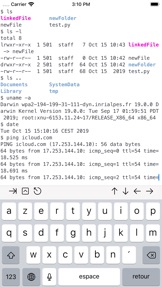
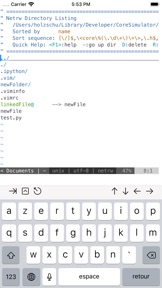
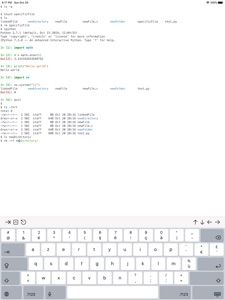
a-Shell is a complete local terminal emulator, allowing to run most Unix commands on you iOS device. You can transfer files using scp and curl, edit them with vim and ed, process them using grep, awk and sed. You can work with git repositories using lg2.
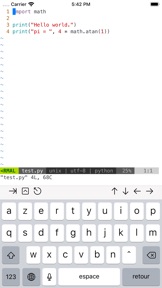
a-Shell includes Python, Lua, Perl, JavaScript, C, C++ for programming and TeX (texlive 2022, with Tikz and LuaTeX) for text processing.
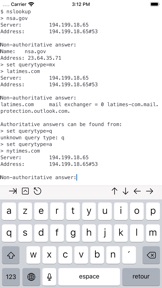
There are also multiple network utilities: nslookup, ping, whois, ifconfig... Type help for help, help -l to get the full list of commands.
a-Shell can be controlled from Shortcuts: run commands in order, process files in a-Shell, get the results as text or files, transfer files to other apps...
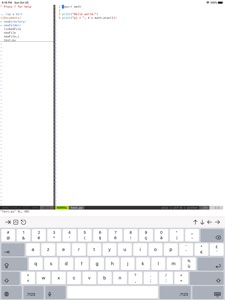
a-shell uses iOS 13+ “multiple windows” ability, so you can run multiple shells at the same time, with different commands, in different directories. You can edit a file in one window with vim and process it in the other with python.
Compile your C or C++ programs to webAssembly using clang or clang++, and execute the resulting binary. A complete webAssembly SDK is included (WASI-libc).
a-Shell is the complete version. If you need a smaller app, and you don't need a C compiler, a TeX engine, or numpy and matplotlib, there is a-Shell mini.

What's New in Version 1.10.1

- Everything from 1.10.0, plus fixing a bug in the interactive version of dash:
- new toolbar option for iPads, using iOS styling (you can switch to it using Settings).
- updated Python to version 3.11, Vim to version 8.2, Lua to version 5.4.4
- a-Shell (including Vim) now works with Scribble (character recognition using Apple pencil)
- options to customize cursor shape (config -k)
- new command: multimarkdown, to convert Markdown files to other formats (including TeX)
- keyboard commands to change the font size: command +, command - (and control + / control - too)
- new option (in Settings) to not restore windows content when the app restarts.
- many bug fixes: long scrolling does not reset to the beginning randomly, font size remains the same when going to the background, the app keeps keyboard focus, Vim plugins can execute dash commands...

Seller

Information

Categories

Version

1.10.1

Size

1,244.4 MB

Game Center

No

VPP Device Licensing

Yes

Rating

Rated 17+ for the following:
Unrestricted Web Access

Compatibility

iOS 14.0 or later

Devices

iPhone 5s, iPhone 6, iPhone 6 Plus, iPhone 6s, iPhone 6s Plus, iPhone SE, iPhone 7, iPhone 7 Plus, iPhone 8, iPhone 8 Plus, iPhone X, iPhone XR, iPhone XS, iPhone XS Max, iPhone 11, iPhone 11 Pro, iPhone 11 Pro Max, iPhone SE (2nd generation), iPhone 12, iPhone 12 Pro, iPhone 12 Pro Max, iPhone 12 mini, iPhone 13, iPhone 13 Pro, iPhone 13 Pro Max, iPhone 13 mini, iPhone SE (3rd generation), iPhone 14, iPhone 14 Plus, iPhone 14 Pro, iPhone 14 Pro Max, iPad (5th Generation) Wi-Fi, iPad (5th Generation) Wi-Fi + Cellular, iPad (6th generation) Wi-Fi, iPad (6th generation) Wi-Fi + Cellular, iPad Pro, iPad Pro (Cellular), iPad Pro (9.7-inch), iPad Pro (9.7-inch) (Cellular), iPad Pro 12.9-inch (2nd generation), iPad Pro 12.9-inch (2nd generation) Wi-Fi + Cellular, iPad Pro (10.5-inch), iPad Pro (10.5-inch) Wi-Fi + Cellular, iPad Pro (11-inch), iPad Pro (11-inch) Wi-Fi + Cellular, iPad Pro 12.9-inch (3rd generation), iPad Pro 12.9-inch (3rd generation) Wi-Fi + Cellular, iPad Air, iPad Air (Cellular), iPad Air 2, iPad Air 2 (Cellular), iPad Air (3rd generation), iPad Air (3rd generation) Wi-Fi + Cellular, iPad mini Retina, iPad mini Retina (Cellular), iPad mini 3, iPad mini 3 (Cellular), iPad mini 4, iPad mini 4 (Cellular), iPad mini (5th Generation), iPad mini (5th Generation) Wi-Fi + Cellular, iPad (7th generation) Wi-Fi + Cellular, iPad Pro 11-inch (2nd generation), iPad Pro 11-inch (2nd generation) Wi-Fi + Cellular, iPad Pro 12.9-inch (4th generation), iPad Pro 12.9-inch (4th generation) Wi-Fi + Cellular, iPad Air (4th Generation) (Wi-Fi), iPad Air (4th Generation) (Wi-Fi + Cellular), iPad (8th generation) Wi-Fi, iPad (8th generation) Wi-Fi + Cellular, iPad Pro 11-inch (3rd generation), iPad Pro 11-inch (3rd generation) Wi-Fi + Cellular, iPad Pro 12.9-inch (5th Generation), iPad Pro 12.9-inch (5th Generation) Wi-Fi + Cellular, iPad (9th Generation), iPad (9th Generation) Wi-Fi + Cellular, iPad mini (6th Generation), iPad mini (6th Generation) Wi-Fi + Cellular, iPad Air (5th generation), iPad Air (5th generation) Wi-Fi + Cellular, iPad Pro 11-inch (4th generation), iPad Pro 11-inch (4th generation) Wi-Fi + Cellular, iPad Pro 12.9-inch (6th generation), iPad Pro 12.9-inch (6th generation) Wi-Fi + Cellular, iPad (10th generation), iPad (10th generation) Wi-Fi + Cellular, iPod touch (6th Generation), iPod touch (7th generation)

Languages

English, French, German, Japanese, Korean, Spanish

App Store: Customer Ratings

Ratings & Reviews

4.0 of 5 (3 Ratings)

App Store: Customer Reviews

2019-12-07

Nice

[Update: 7 Dec 2019] - I’m wondering why I keep getting no module named ‘encodings’ when using some commands.
Need to play around with it a little more 😊
d8nnii
Version 1.2